
To mark orders as partially shipped manually (individual orders)
1. Go to Orders on the left hand menu OR E-Commerce > Orders. There is also another option of viewing orders from your sign in dashboard.
2. Next to the order you want to mark as shipped, click the truck symbol.

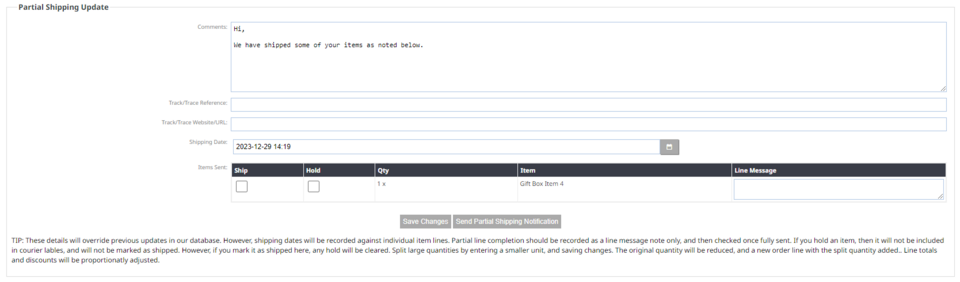
The partial shipping notification area can be found by scrolling down the page.
3. Here you can adjust your shipping message per order if needed. This default message can be adjusted by following the instructions here.
4. Enter your customers track/trace reference number.
5. Enter your courier companies tracking URL.
6. You can adjust the shipping date.
7. Use the check boxes under Ship to check the items you are sending.
Save changes: Just saves the information you have inputted here.
Send Partial Shipping Notification: Marks the items ticked as shipped and emails the customer the shipping notification.
More From This Section
If you are not using an automatic payment gateway, (e.g. manual internet banking) you may need to mark your orders as paid manually.
You can do this individually which allows you to make adjustments if needed, or you can mark many orders as paid in bulk.
If you are using a courier integration, depending on your settings - your courier company will be feeding the tracking number back into the website.
Some courier integrations will have settings allowing you to send the notification from their dashboard, or to send from the CMS.
These settings below show how to mark orders as shipped manually.
If you are only partially shipping some of an order, you can send partial shipping notifications.
If you have a collection option, this is how you can send a notification that the order is ready to collect and any collection information.
Can I give access to just the order picking function to a warehouse employee who should not access other functions?
FAQ Topics
Building your site
Advanced Page Types
E-Commerce
- Shopping Basics
- Product Pricing, Currencies
- Category Management
- Products
- Product Options
- Layout and Formatting
- Payment Options
- Freight - Couriers
- Processing Orders
- Orders / Invoices
- Advanced Ecommerce
- Plugins
- Wholesale
- Bookings Management System
- Stock & Quantities
- Vouchers, Discounts, Loyalty Points
- Selling Photos / Prints
- Shopping Cart Add-on Page types
- Advanced APIs / Add ons
- Point of Sale (POS)
- Reports
Email & Membership
Promoting your site
Advanced
- Power User Options
- Form Spam Filtering
- Wordpress
- PHP Setup
- [TAGS]
- jQuery snippets
- Search External Links / Import external content
- HTML / CSS Snippets
- Embedding Web Fonts
- Loading additional Material Symbols styles
- FAQ Help Map
- Uploading local font files
- Advanced Template Customisation, CSS, etc
- Languages and Translations
- Importing Content from Another Platform
