
Future Dating Posts, Archiving Posts
You can set publishing dates for the blog posts, to schedule a series of blogs in advance.
Setting the archive date and delete date with hide the posts, or delete the posts on the specified day respectively.
Changing the post order
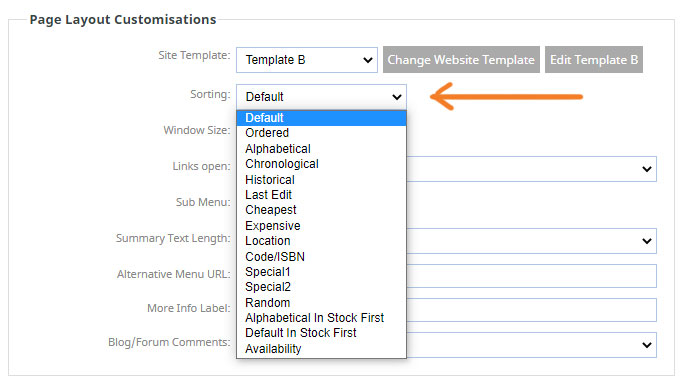
Post orders appear by default with the most recent post at the top of the list, but you can change the order of the posts by clicking the page OPTIONS tab, then the sorting dropdown.
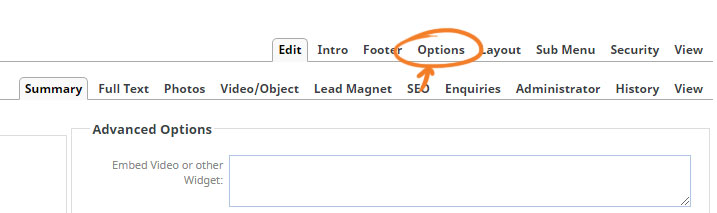
Clicking the page OPTIONS tab will show a series of settings, look for the Page Layout Customisations section, then choose the required option from the SORTING dropdown.
More From This Section
You can change the layout of the index page at any time.
You can duplicate any Blog, News or Gallery posts with the click of a button.
You can move Blog or News, Gallery posts to a different post-page in bulk by clicking the checkbox next to each post.
You can add tags to posts via the Blog Tags field when creating a post, which can then be used by a viewer to show only the posts with the tag.
If needed you can create more advanced blog post layouts using the drag-drop editor - here's how to change the editor.
You can give your post a custom filename rather than the default system generated one.
FAQ Topics
Building your site
Advanced Page Types
E-Commerce
- Shopping Basics
- Product Pricing, Currencies
- Category Management
- Products
- Product Options
- Layout and Formatting
- Payment Options
- Freight - Couriers
- Processing Orders
- Orders / Invoices
- Advanced Ecommerce
- Plugins
- Wholesale
- Bookings Management System
- Stock & Quantities
- Vouchers, Discounts, Loyalty Points
- Selling Photos / Prints
- Shopping Cart Add-on Page types
- Advanced APIs / Add ons
- Point of Sale (POS)
- Reports
Email & Membership
Promoting your site
Advanced
- Power User Options
- Form Spam Filtering
- Wordpress
- PHP Setup
- [TAGS]
- jQuery snippets
- Search External Links / Import external content
- HTML / CSS Snippets
- Embedding Web Fonts
- Loading additional Material Symbols styles
- FAQ Help Map
- Uploading local font files
- Advanced Template Customisation, CSS, etc
- Languages and Translations
- Importing Content from Another Platform
