
News/Events/FAQs pages allow different articles/information to be entered as listings on one page. Each listing contains a title and a short summary, and a link to the full article/information page.
When adding a new news/event or FAQ page, you'll be able to add content to both the Summary area and the main page body, as in this screenshot: 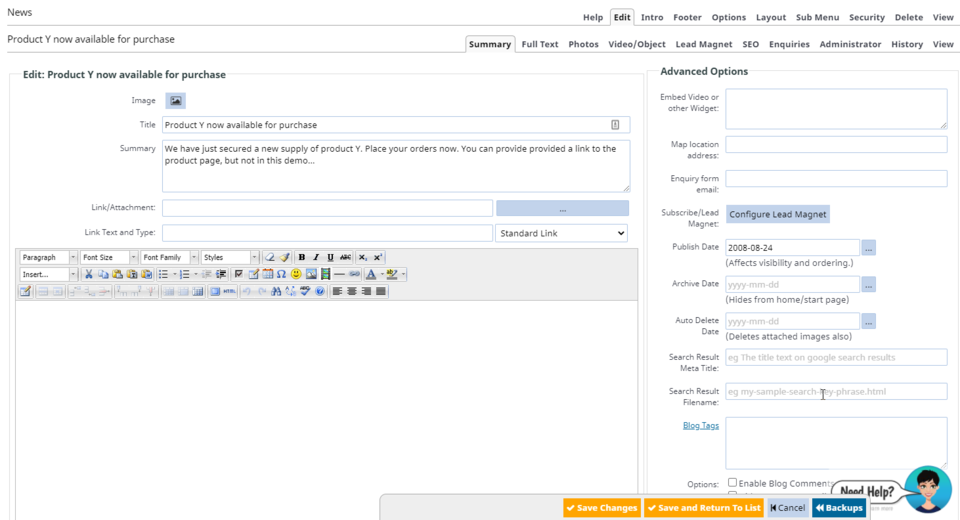
To add one of the 4 events page types, click Add a new page, Alternative layouts here beside
Gallery Page/News/Events/FAQ
More From This Section
You can change the layout of the index page at any time.
You can duplicate any Blog, News or Gallery posts with the click of a button.
You can move Blog or News, Gallery posts to a different post-page in bulk by clicking the checkbox next to each post.
You can add tags to posts via the Blog Tags field when creating a post, which can then be used by a viewer to show only the posts with the tag.
If needed you can create more advanced blog post layouts using the drag-drop editor - here's how to change the editor.
You can give your post a custom filename rather than the default system generated one.
FAQ Topics
Building your site
Advanced Page Types
E-Commerce
- Shopping Basics
- Product Pricing, Currencies
- Category Management
- Products
- Product Options
- Layout and Formatting
- Payment Options
- Freight - Couriers
- Processing Orders
- Orders / Invoices
- Advanced Ecommerce
- Plugins
- Wholesale
- Bookings Management System
- Stock & Quantities
- Vouchers, Discounts, Loyalty Points
- Selling Photos / Prints
- Shopping Cart Add-on Page types
- Advanced APIs / Add ons
- Point of Sale (POS)
- Reports
Email & Membership
Promoting your site
Advanced
- Power User Options
- Form Spam Filtering
- Wordpress
- PHP Setup
- [TAGS]
- jQuery snippets
- Search External Links / Import external content
- HTML / CSS Snippets
- Embedding Web Fonts
- Loading additional Material Symbols styles
- FAQ Help Map
- Uploading local font files
- Advanced Template Customisation, CSS, etc
- Languages and Translations
- Importing Content from Another Platform
