
In the Drag-drop and Contentbox editors, you can set an image to blend with its background colour via the STYLE EDITOR modal.
- To launch the Style Editor - hover over the required image and click the RED CHAIN icon that appears over the image.
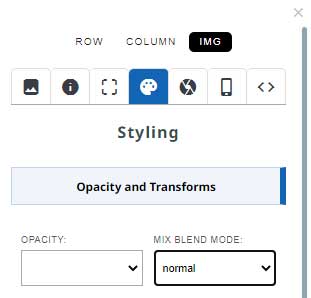
- Click the styling palette icon, then choose the required mix blend mode from the OPACITY AND TRANSFORMS section.
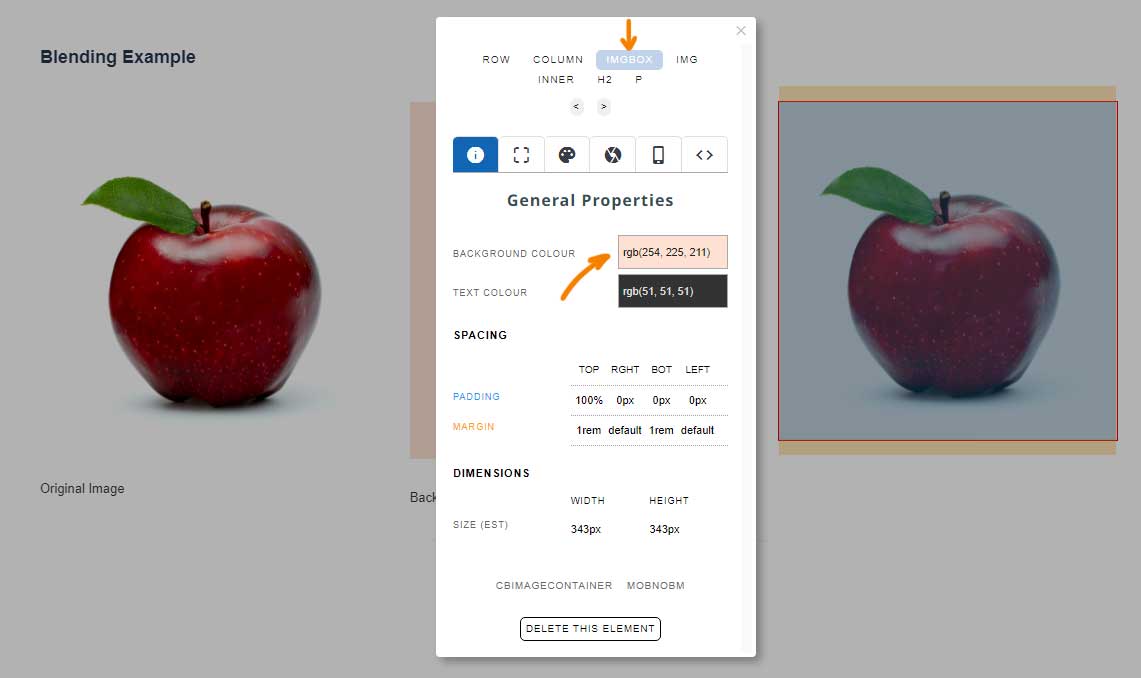
Blending Example

Original Image
Background Colour
Background Colour set to an element, such as column, or inner.
A mix-blend-mode of Multiply was used.
Targetting an element to apply a Background Colour to:
Depending on the snippet block used, there will be different elements that you can target to apply the background colour to.
Columns generally have space around the outside, but if your snippet block has FIGURE, IMGBOX or INNER elements available, these can have their background colour set via the STYLE EDITOR (example below).
More From This Section
The Smaller Animals thumbnailer is great tool if you want to create smaller image file sizes before uploading lots of photos, or if you want to watermark your photos.
It is easy to create a popup of higher resolution images. Learn how
With the Drag-drop and Contentbox editors you can add a clipping path to an image
In the Drag-drop and Contentbox editors, you can set an image to blend with its background colour via the STYLE EDITOR modal.
This is the old method of adding rotating images to your website
You can add pins over the top of the image with a link and small description on hover.
You can add image dimensons (image height and image width) to your images via the Style Editor Popup
FAQ Topics
Building your site
- Pages
- Content Editor Modes Explained
- - DRAG DROP Editor (Default)
- - CONTENTBOX Editor (Advanced)
- - WORD STYLE Editor (TinyMCE)
- - LIVE Editor (Click to Edit Mode)
- Styling Content
- Images / Backgrounds
- Banners and Sliders
- Uploading content
- Design Templates
- Forms
- More Q & A
- Menus
- Mobile Styling and Optimisation
Advanced Page Types
E-Commerce
- Shopping Basics
- Product Pricing, Currencies
- Category Management
- منتجات
- Product Options
- Layout and Formatting
- خيارات الدفع
- Freight - Couriers
- Processing Orders
- Orders / Invoices
- Advanced Ecommerce
- Plugins
- Wholesale
- Bookings Management System
- Stock & Quantities
- Vouchers, Discounts, Loyalty Points
- Selling Photos / Prints
- Shopping Cart Add-on Page types
- Advanced APIs / Add ons
- نقطة البيع (POS)
- Reports
Email & Membership
- Member Management
- Members Pages / Template Customisations
- From Addresses and Reply To Email Notifications
- Global Enquiry form options
- Standard Field Names
- Webmail
- Bulk Email
- CRM Features
- Email Campaigns
- Forums & Blogs
- Pop3/Imap Email Services
- Scams and Hoaxes
- Lead Magnets / Growing Your Customer Database
Promoting your site
Advanced
- Power User Options
- Form Spam Filtering
- Wordpress
- PHP Setup
- [TAGS]
- jQuery snippets
- Search External Links / Import external content
- HTML / CSS Snippets
- Embedding Web Fonts
- Loading additional Material Symbols styles
- FAQ Help Map
- Uploading local font files
- Advanced Template Customisation, CSS, etc
- Languages and Translations
- Importing Content from Another Platform
