
How to add a All Products Category - All, New, On Special or Reviews Category types
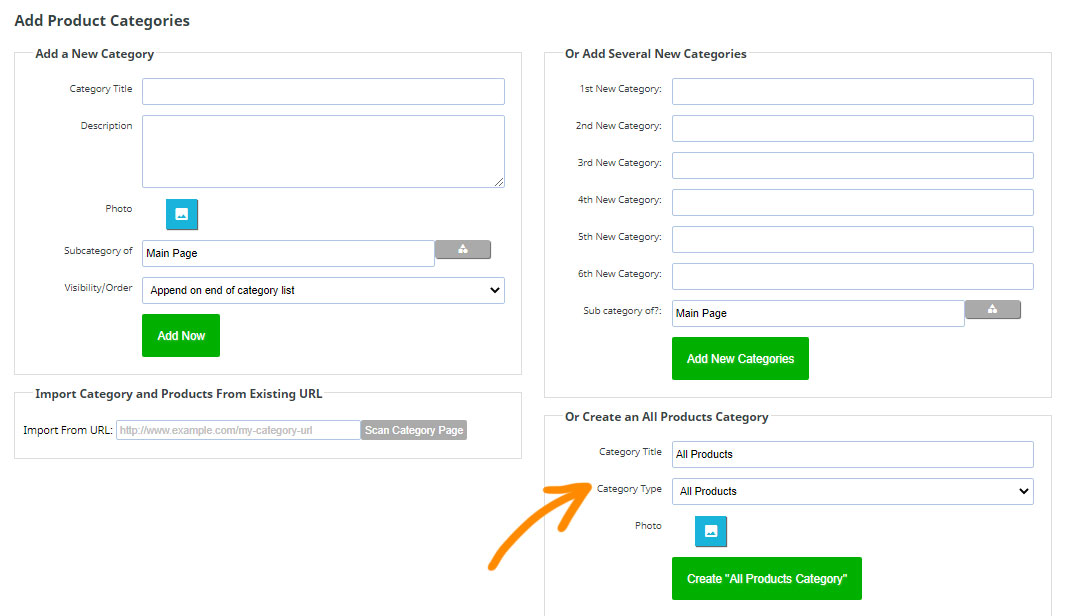
There is an option to add some special category types, that auto populate with All Products, New Products, Specials or Reviews. You can set this via an option on the Add Product Categories page.
To add an All Category
- Go to Ecommerce > An New Categories
- Choose Category Type from the Create an All Products Category section.
- Specify the additional settings as required.
Creating/Auto-populating Brand Categories (if you have the brand name in the supplier or manufacturer field in your products)
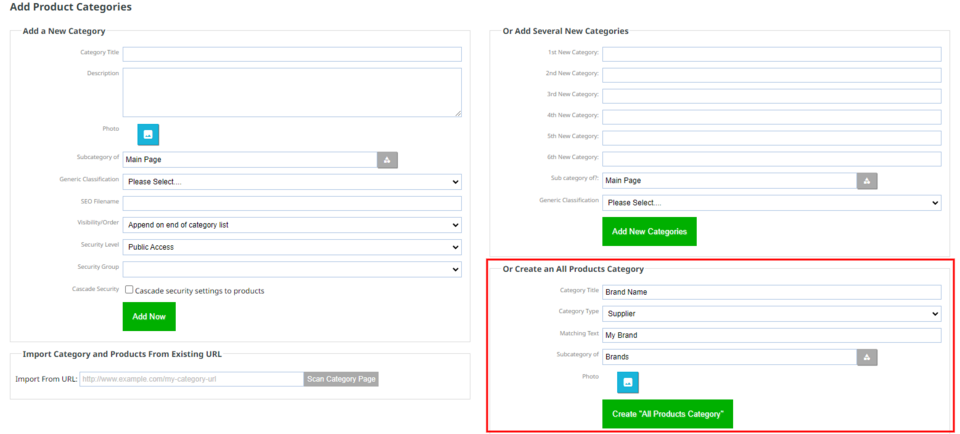
Using this section, you can also auto populate categories for supplier (or you could use this field for brand) or manufacturer or any of your extra custom fields.
E.g. If you have the brand name in the supplier field in your product and you want to make automatic brand categories:
- يختار Add New Category where you want this new category to appear, e.g. if your top category was brands, your new category would be a brand name.
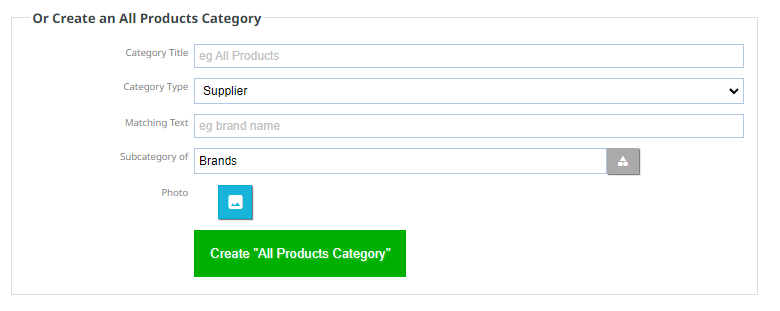
- Select category type first, then the other options will appear.
- The supplier name needs to match the text you add in the "Matching text" box, and if it does, it will add any products automatically to that category and continue to do so.
More From This Section
How to add a new category to your shopping page
You can move a single Category or multiple Categories in bulk via the E-Commerce > View Products area
You can quickly reorganise your categories to become sub-categories
You can delete a Category, but if products exist in the website you must delete the products first.
If you want your customers to access a category from multiple locations you can create an empty category and set a redirect
As well as adding your own custom categories you can add an automated category that shows products based on what option you choose. You can also use this to auto-populate categories for brands, suppliers, manufacturer, or your extra fields.
Specials only show in this category if is a difference in RRP vs Checkout Price (Not auto-discounts)
You can add information to a category area that will appear as an information tab on all products in the category (Additional Information Category Wide)
Or do you need to create relationships between your products, and the make/model/type of products where they can be applied? eg Car automotive industry, some parts fit many different types of cars. Yes you can
Typical use case, when selling cars. You might list your cars with data associated for make/model/variant year.
In the ecommerce > Display Options area you can check a box 'Show Product Sorting Dropdown' to show a product sorting option on the Product list page. Sorting can also be changed globally and per category.
by default hiding a category does not hide the products within it. By checking the cascade security options found in the Category settings area the security setting you choose for the categories can be applied to the subcategories and products within.
You can add content into the intro area of any category
FAQ Topics
Building your site
- Pages
- Content Editor Modes Explained
- - DRAG DROP Editor (Default)
- - CONTENTBOX Editor (Advanced)
- - WORD STYLE Editor (TinyMCE)
- - LIVE Editor (Click to Edit Mode)
- Styling Content
- Images / Backgrounds
- Banners and Sliders
- Uploading content
- Design Templates
- Forms
- More Q & A
- Menus
- Mobile Styling and Optimisation
Advanced Page Types
E-Commerce
- Shopping Basics
- Product Pricing, Currencies
- Category Management
- منتجات
- Product Options
- Layout and Formatting
- خيارات الدفع
- Freight - Couriers
- Processing Orders
- Orders / Invoices
- Advanced Ecommerce
- Plugins
- Wholesale
- Bookings Management System
- Stock & Quantities
- Vouchers, Discounts, Loyalty Points
- Selling Photos / Prints
- Shopping Cart Add-on Page types
- Advanced APIs / Add ons
- نقطة البيع (POS)
- Reports
Email & Membership
- Member Management
- Members Pages / Template Customisations
- From Addresses and Reply To Email Notifications
- Global Enquiry form options
- Standard Field Names
- Webmail
- Bulk Email
- CRM Features
- Email Campaigns
- Forums & Blogs
- Pop3/Imap Email Services
- Scams and Hoaxes
- Lead Magnets / Growing Your Customer Database
Promoting your site
Advanced
- Power User Options
- Form Spam Filtering
- Wordpress
- PHP Setup
- [TAGS]
- jQuery snippets
- Search External Links / Import external content
- HTML / CSS Snippets
- Embedding Web Fonts
- Loading additional Material Symbols styles
- FAQ Help Map
- Uploading local font files
- Advanced Template Customisation, CSS, etc
- Languages and Translations
- Importing Content from Another Platform
