
To hide an individual product by editing the product
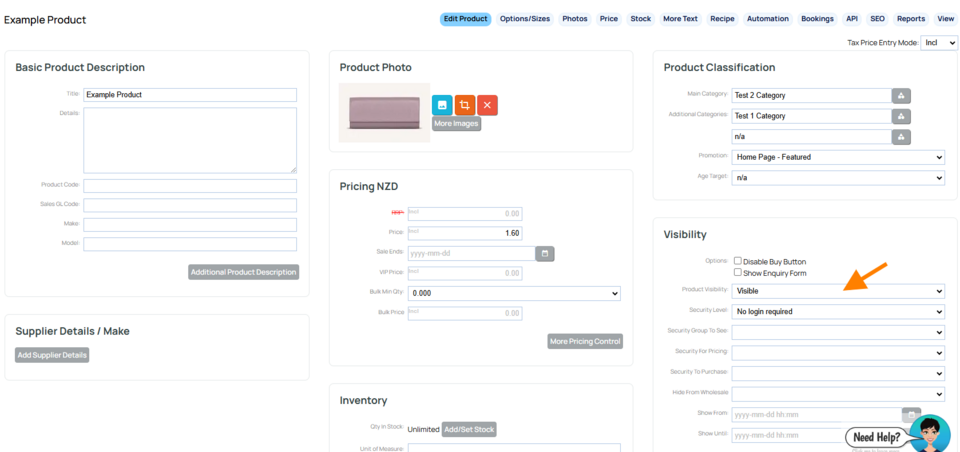
- Open up the specific product you want to hide.
- Select the Visibility option you want. Your choices are: Hidden (searchable) which means product is not shown but will show in search results, or HIDDEN / BLOCKED which will not show at all
BELOW: When editing the product you can [1] quick hide using the buttons shown, or [2] change with a few more options using the Visibilty dropdown.
Hiding an individual category via the categories area
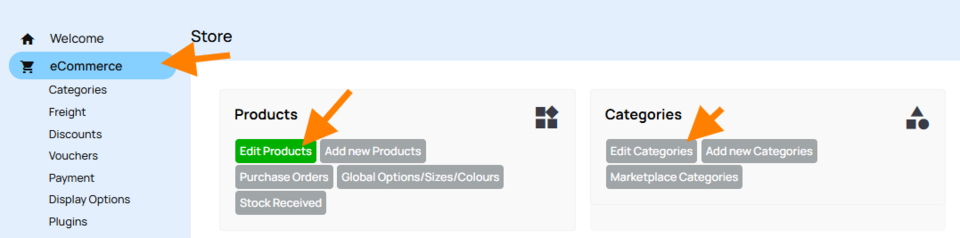
- Click the blue E-ECOMMERCE button then Choose to EDIT CATEGORIES from the categories section.
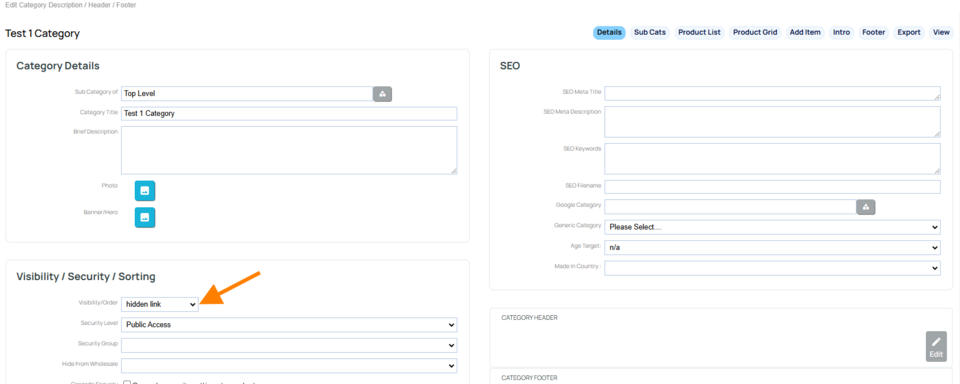
Edit the chosen category and set the visibility
- Click the pencil icon next to the category you would like to edit.
- Choose the relevant hide option from the Visibility dropdown.
HIDE AND BLOCKED - Will block the product completely, hiding it from public view even if a direct link to the product is clicked.
HIDDEN LINK - Hidden from the menu and search function, but can still be viewed by a direct link.
HIDDEN AND SEARCHABLE - Hidden from the menu, but can be found via the website search function.
Hiding Products or Categories in bulk via the products area
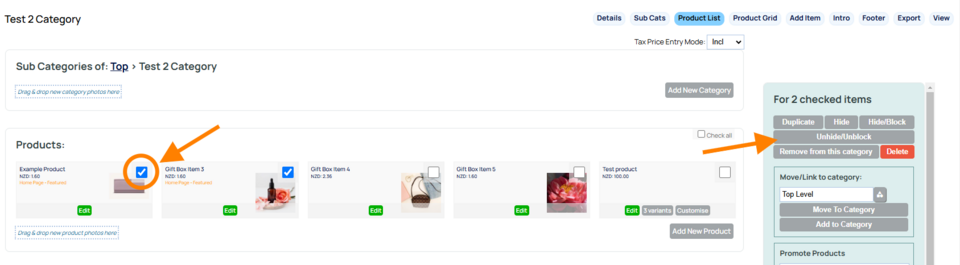
- In the shopping area, Choose to EDIT PRODUCTS
- Navigate to the screen showing the required categories or products
- Click the CHECK BOX next to any of the products you want to hide
- Scroll down and click the relevant HIDE button to hide all the selected products.
More From This Section
Description of the typical procedure for online sales.
Find out if an ecommerce site is appropriate for your organisation
This tutorial provides information on the main steps involved with seting up your own new catalogue and shopping cart, with credit card and other payment options
Here is how you change the visibity of products or categories.
We now have a wedding wish list feature
If you don't have an e-commerce tab, then a shop page has not been made on your site. Find out how to add one here.
FAQ Topics
Building your site
- Pages
- Content Editor Modes Explained
- - DRAG DROP Editor (Default)
- - CONTENTBOX Editor (Advanced)
- - WORD STYLE Editor (TinyMCE)
- - LIVE Editor (Click to Edit Mode)
- Styling Content
- Images / Backgrounds
- Banners and Sliders
- Uploading content
- Design Templates
- Forms
- More Q & A
- Menus
- Mobile Styling and Optimisation
Advanced Page Types
E-Commerce
- Shopping Basics
- Product Pricing, Currencies
- Category Management
- منتجات
- Product Options
- Layout and Formatting
- خيارات الدفع
- Freight - Couriers
- Processing Orders
- Orders / Invoices
- Advanced Ecommerce
- Plugins
- Wholesale
- Bookings Management System
- Stock & Quantities
- Vouchers, Discounts, Loyalty Points
- Selling Photos / Prints
- Shopping Cart Add-on Page types
- Advanced APIs / Add ons
- نقطة البيع (POS)
- Reports
Email & Membership
- Member Management
- Members Pages / Template Customisations
- From Addresses and Reply To Email Notifications
- Global Enquiry form options
- Standard Field Names
- Webmail
- Bulk Email
- CRM Features
- Email Campaigns
- Forums & Blogs
- Pop3/Imap Email Services
- Scams and Hoaxes
- Lead Magnets / Growing Your Customer Database
Promoting your site
Advanced
- Power User Options
- Form Spam Filtering
- Wordpress
- PHP Setup
- [TAGS]
- jQuery snippets
- Search External Links / Import external content
- HTML / CSS Snippets
- Embedding Web Fonts
- Loading additional Material Symbols styles
- FAQ Help Map
- Uploading local font files
- Advanced Template Customisation, CSS, etc
- Languages and Translations
- Importing Content from Another Platform
