
Show More Button - To replace long list pagination...
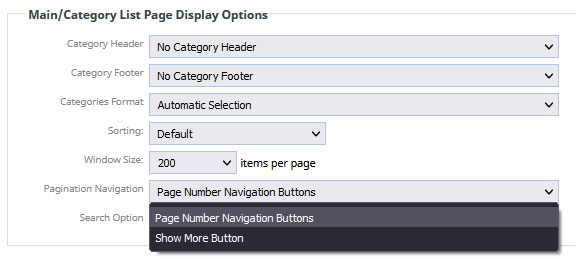
You can change the settting via E-COMMERCE > DISPLAY OPTIONS > PAGINATION NAVIGATION
(And immediately above that new setting, is where you can increase your window/paging size).
Smaller numbers give faster loading times for google, and lower bandwidth consumption (for most customers who don't look at the photos).
Bigger numbers are better for customers who want to browse the photos.
Layout examples

Product List with default pagination

default pagination replaced with Show More button. Clicking Show More will append the page with the next set of images.
More From This Section
Replace long product list pagination with a show more button.
If your template supports it you can promote items with featured product stamps or stickers in the product list.
An overview of the options that can be set for your Category / Product List pages, via E-COMMERCE > Customise Display Options area
You can show additional images via the Peak reveal additional images slideshow option
FAQ Topics
Building your site
Advanced Page Types
E-Commerce
- Shopping Basics
- Category Management
- Products
- Product Options
- Layout and Formatting
- Payment Options
- Processing Orders
- Advanced Ecommerce
- Product Pricing, Currencies
- Plugins
- Wholesale
- Bookings Management System
- Freight - Couriers
- Stock & Quantities
- Vouchers, Discounts, Loyalty Points
- Selling Photos / Prints
- Shopping Cart Add-on Page types
- Advanced APIs / Add ons
- Point of Sale (POS)
- Reports
- Orders / Invoices
Email & Membership
Promoting your site
Advanced
- Power User Options
- Form Spam Filtering
- Wordpress
- PHP Setup
- [TAGS]
- jQuery snippets
- Search External Links / Import external content
- HTML / CSS Snippets
- Embedding Web Fonts
- Loading additional Material Symbols styles
- FAQ Help Map
- Uploading local font files
- Advanced Template Customisation, CSS, etc
- Languages and Translations
