
You can copy a Contentbox section and paste into a new page via the Contentbox settings modal.
To copy a section
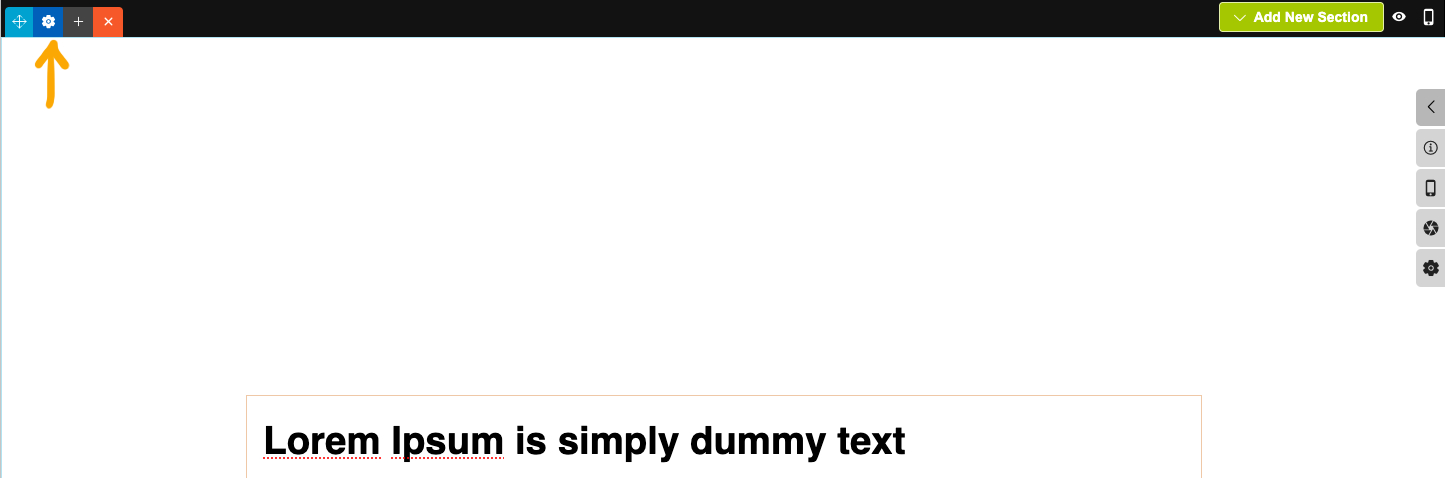
- Click the BLUE COG icon top left of the section
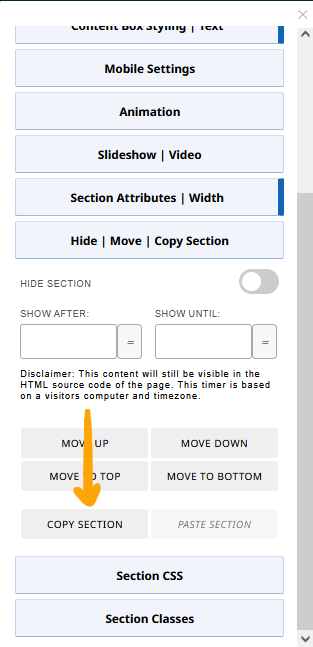
- From the Contentbox settings modal that appears, click the HIDE | MOVE | COPY SECTION button to open the settings.
- Click COPY SECTION.
To paste a section
- Navigate to the relevant Page / Content Area
- If the editor used is not the Contentbox Editor you should change to it via the CHANGE EDITOR MODE dropdown top-right.
- Click the BLUE COG icon top left of the section above where you want the section to be pasted
- From the Contentbox settings modal that appears, click the HIDE | MOVE | COPY SECTION button to open the settings.
- Click PASTE SECTION.
- If you changed editor mode to Contentbox, you will have the default section still showing, you can delete this via the ORANGE X button at the top of the section.
- Save your changes.
More From This Section
To add a new Contentbox section click the green ADD SECTION button top-right of the active Contentbox window
To delete a Contentbox section, click the orange X icon top-left of the section or the orange X REMOVE button at the bottom.
To move a Contentbox section, click the light blue direction icon top-left of the section
If you want to create a menu link that takes a viewer down to a specific contentbox section here's how to do it
Click the dark blue cog icon top-left of the section to bring up the Contentbox settings popup
You can adjust a background image tint via the OVERLAY settings
Click the dark blue cog icon top-left of the section to bring up the Contentbox settings popup
You can set or change the spacing amount above/below the content area of a section.
Click the dark blue cog icon top-left of the section to bring up the Contentbox settings popup
If you need to have a different mobile height for your contentbox section e.g. banner section, you can set this in the contentbox settings.
You can copy a Contentbox section and paste into a new page via the Contentbox settings modal.
You can temporarily hide a Contentbox section from view. This will hide the section and any content within it.
FAQ Topics
Building your site
Advanced Page Types
E-Commerce
- Shopping Basics
- Product Pricing, Currencies
- Category Management
- Products
- Product Options
- Layout and Formatting
- Payment Options
- Freight - Couriers
- Processing Orders
- Orders / Invoices
- Advanced Ecommerce
- Plugins
- Wholesale
- Bookings Management System
- Stock & Quantities
- Vouchers, Discounts, Loyalty Points
- Selling Photos / Prints
- Shopping Cart Add-on Page types
- Advanced APIs / Add ons
- Point of Sale (POS)
- Reports
Email & Membership
Promoting your site
Advanced
- Power User Options
- Form Spam Filtering
- Wordpress
- PHP Setup
- [TAGS]
- jQuery snippets
- Search External Links / Import external content
- HTML / CSS Snippets
- Embedding Web Fonts
- Loading additional Material Symbols styles
- FAQ Help Map
- Uploading local font files
- Advanced Template Customisation, CSS, etc
- Languages and Translations
- Importing Content from Another Platform
