
To restore a wordpress backup.
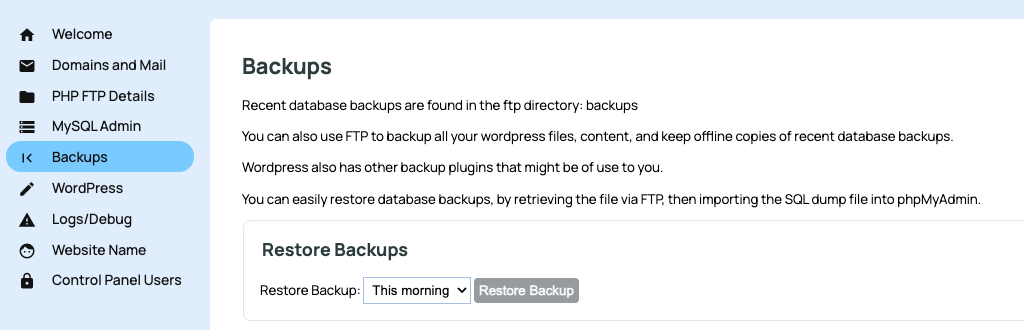
- Click the BACKUPS button in the left-hand menu
- Choose the backup date to restore from
- Click RESTORE BACKUP
Once actioned the System Actions Queue will show the backup in progress for site files and database.
This will change to completed once the process has finished.
More From This Section
For Wordpress hosting the CMS uses a basic control panel for managing your wordpress install.
With the wordpress control panel you have the ability to restore a backup up to 28 days old.
You can access your wordpress files via an FTP login
You can view existing administrators, add new administrators or update a password for a login via the Wordpress Management Panel.
You can add additional admins to access the control panel options.
Learn how to migrate wordpress sites with no downtime, and minimal data loss.
FAQ Topics
Building your site
Advanced Page Types
E-Commerce
- Shopping Basics
- Product Pricing, Currencies
- Category Management
- Products
- Product Options
- Layout and Formatting
- Payment Options
- Freight - Couriers
- Processing Orders
- Orders / Invoices
- Advanced Ecommerce
- Plugins
- Wholesale
- Bookings Management System
- Stock & Quantities
- Vouchers, Discounts, Loyalty Points
- Selling Photos / Prints
- Shopping Cart Add-on Page types
- Advanced APIs / Add ons
- Point of Sale (POS)
- Reports
Email & Membership
Promoting your site
Advanced
- Power User Options
- Form Spam Filtering
- Wordpress
- PHP Setup
- [TAGS]
- jQuery snippets
- Search External Links / Import external content
- HTML / CSS Snippets
- Embedding Web Fonts
- Loading additional Material Symbols styles
- FAQ Help Map
- Uploading local font files
- Advanced Template Customisation, CSS, etc
- Languages and Translations
- Importing Content from Another Platform
