
If you have set up different price groups for your wholesale or other customers you can assign a member to the relevant group via their member record.
Setting Price Groups
Products and Product Variations can have different pricing applied via Price Groups - there are 8 price groups available - price groups A - H.
Note: Price Group titles can be reworded via the DESIGN > REWORD PROMPTS area to something more meaningful.
Members must login to get their custom pricing.
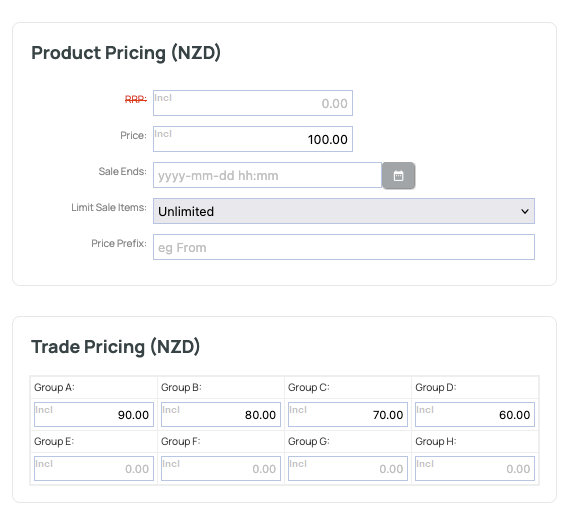
An example of Price Groups A - D showing different pricing for the product. A member must be set to the relevant group in their member record to receive the price.
Specifiying the Price Group for the member.
You can set the price group for a member via the MEMBERS area.
- Find the member record you wish to update.
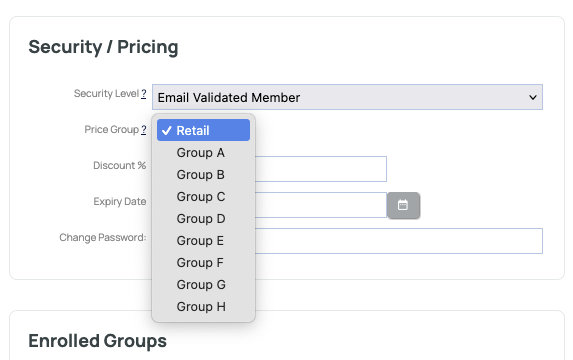
- Select the relevant price group from the SECURITY / PRICING area on the right hand side.
More From This Section
Not limited to 'email lists' members can be allowed certain (limited) site privileges. There are many member security levels. These affect access to password protected pages and also to emailing lists. They are explained in more detail here
How to add a new member either singularly or by bulk.
There are multiple options to import members data
How to make a member group
To see what a customer sees when logging into the website you can quickly log in as the member.
Learn about member registration forms, passwords, and member lifecycles.
You can use our shopping cart to sell term memberships, with automated password delivery for 24/7 real time access, and our bulk emailer to communicate renewals.
You can assign members to get VIP / Price Group A pricing automatically on login.
How to assign members to groups, give different authorisation levels, or assign different price groups.
By assigning a member record to a certain administrator and configuring the additional administrators access settings, you can set it up so that each admin can only access their assigned members records.
Sales agents associated with a customer will get a CC of the order email irrespective of POS / customer portal.
You can download your members data and members reports in the CMS.
How to delete members from CMS
You can send the customer a temporary password from the MEMBERS area.
If you have set up different price groups for your wholesale or other customers you can assign a member to the relevant group via their member record
If you have multiple members belonging to one organisation - an accounts email can be specified in the member record to receive system notifications for any orders made.
How to merge member profiles
FAQ Topics
Building your site
Advanced Page Types
E-Commerce
- Shopping Basics
- Category Management
- Products
- Product Options
- Layout and Formatting
- Payment Options
- Processing Orders
- Advanced Ecommerce
- Product Pricing, Currencies
- Plugins
- Wholesale
- Bookings Management System
- Freight - Couriers
- Stock & Quantities
- Vouchers, Discounts, Loyalty Points
- Selling Photos / Prints
- Shopping Cart Add-on Page types
- Advanced APIs / Add ons
- Point of Sale (POS)
- Reports
- Orders / Invoices
Email & Membership
Promoting your site
Advanced
- Power User Options
- Form Spam Filtering
- Wordpress
- PHP Setup
- [TAGS]
- jQuery snippets
- Search External Links / Import external content
- HTML / CSS Snippets
- Embedding Web Fonts
- Loading additional Material Symbols styles
- FAQ Help Map
- Uploading local font files
- Advanced Template Customisation, CSS, etc
- Languages and Translations
- Importing Content from Another Platform
