
This is a guide to change your A record/CNAME to point to a website hosted elsewhere when your domain is registered with us and our name servers are authoritative.
WARNING: No Warranty nor free support is provided in this area. DNS changes can take 48 hours to propagate, and the same time to fix any mistakes you make. DNS CHANGES CAN AFFECT BOTH EMAIL AND WEBSITES IF INCORRECT. Please get in touch if you would like us to make these changes for you.
- Log in to the Website builder
- Click on Domains / Emails tab.
- Click the DNS button next to the domain.

3. Click Enter A-record or CNAME on the right hand side

4. Enter your new www.CNAME and A record into the boxes provided.
5. Press Save Custom Nameserver Changes.
7. Save and wait a minimum of 1 hour.
DNS changes can take up to 48 hours to take effect.
Example records:
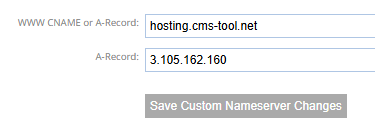
Notes:
- We provide DNS maintenance features for your benefit, however, these require a competency to use, and fixing mistakes is time consuming. We warranty that our system works. We do not warranty to fix mistakes of data entered incorrectly.
More From This Section
What is a domain name? A domain name is required in order to have a custom web address. Learn how domain names work here.
Follow this procedure to register your new domain name.
If you already have a domain name and want to associate it with your new website, follow these steps:
If you have multiple domains attached to a site, one must be assigned as the primary domain.
To up date the contact details of your registered domains.
How to generate a new authorisation key for your domain managed by us.
The nameservers are the machines that convert web addresses (domain names) to machine IP addresses (numerical addresses)
What happens when your domain name is due for renewal
How to point your domain at a website hosted elsewhere using A Record/CNAME records.
Here is where you need to go to change your authoritative nameservers. Change who is responsible for managing your nameservers.
Warning, this is for advanced users only.
Get the steps to validate your website via the CMS. Domain verification. Verify domain name. You can access all 3 methods of domain verification in the domains tab.
Gmail and Yahoo have announced changes that require you to add a DMARC record on your domain before February 1, 2024 if you’d like to continue sending emails from a branded email address.
What to do if you haven't renewed your domain name on time and decide you want to keep it
How to set up a subdomain eg. example.yourdomain.co.nz
Where do I find and the how do I understand my website's statistics?
Sometimes users experience website outages that may not actually be a website outage, but actually an outage of the clients connection, or some link in the middle. Read on.
Q: Will Google Apps work with a free parked domain name?
A: Yes, but we do not provide any free support for this.
Our support obligation for free parked domain names is "Master nameservers" and "Registry Contacts" and "Billing".
It does not include "A-Records and CNAME and MX"
However, DNS is active in any state other than NEW/DELETED.
Some unethical web designers and other registrars fail to set you as the registrant name, and instead use their own name. This is against the .nz rules.
It is a complicated business to purchase a domain name that is registered to someone else. Our support is strictly limited to the following advice.
You can quickly find your domains expiry date in the Domains / Mail area.
You can quickly find some information as to where your domain is managed via the Domains and Mail area.
FAQ Topics
Building your site
Advanced Page Types
E-Commerce
- Shopping Basics
- Product Pricing, Currencies
- Category Management
- Products
- Product Options
- Layout and Formatting
- Payment Options
- Freight - Couriers
- Processing Orders
- Orders / Invoices
- Advanced Ecommerce
- Plugins
- Wholesale
- Bookings Management System
- Stock & Quantities
- Vouchers, Discounts, Loyalty Points
- Selling Photos / Prints
- Shopping Cart Add-on Page types
- Advanced APIs / Add ons
- Point of Sale (POS)
- Reports
Email & Membership
Promoting your site
Advanced
- Power User Options
- Form Spam Filtering
- Wordpress
- PHP Setup
- [TAGS]
- jQuery snippets
- Search External Links / Import external content
- HTML / CSS Snippets
- Embedding Web Fonts
- Loading additional Material Symbols styles
- FAQ Help Map
- Uploading local font files
- Advanced Template Customisation, CSS, etc
- Languages and Translations
- Importing Content from Another Platform
