
While the Status of the Order will change with certain events e.g. payment, you can set a custom Status to appear next to the order via the Notes / History area, when viewing the Order.
Changing the Status will allow to to search/filter orders via the status, and will show theupdated status in the Orders list and detail.
Where to manually change the Status of the Order
When viewing the Order - you can change the Status via the Change Status (Ordered) dropdown in the Notes/History section.
Changing the Status will log the change in the Notes area.
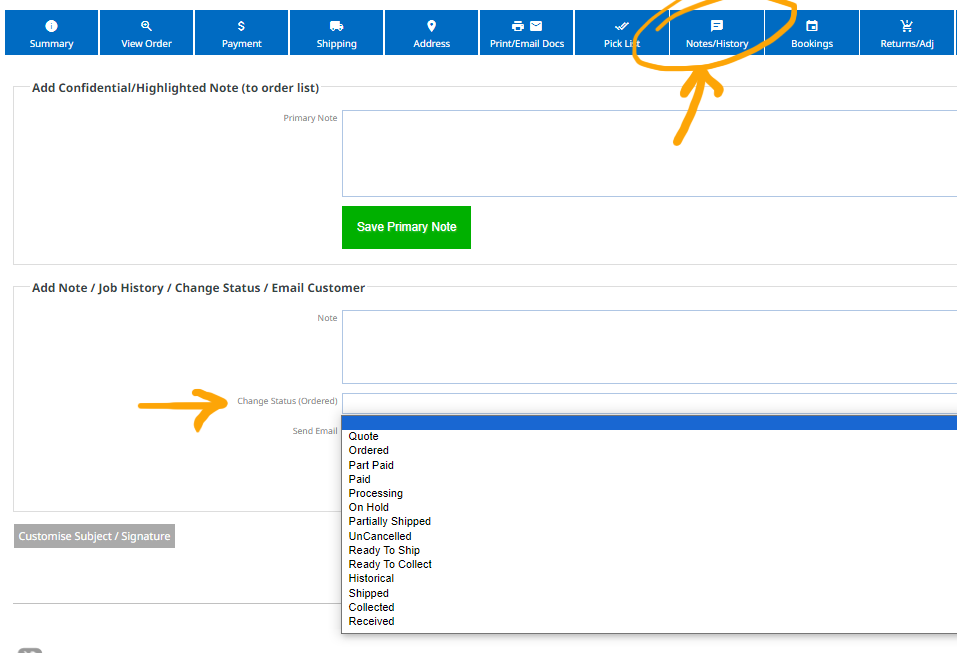
Custom Order Status labels
If using the Job Status Manager plugin, you can create your own Order Statuses that will appear here.
More From This Section
Clicking the Order number (or the blue magnifying glass in the buttons to the right) will provide additional options and detail for managing the order.
In the orders area you can view an interactive picklist for use on a tablet, or for printing out, when looking to get items for an order.
You can update an order received and paid, to return/update stock, add new products or add custom fees or credits. Changes will appear as adjustments to the original invoice.
If needed you can send/resend a customer their order dockets manually via the PRINT/EMAIL DOCS area. You can also choose to view, print or pdf the documents.
Customise the appearance of the notifications that are sent out to your customers.
Heres where to go to change it in the CMS
If you do not want customers to have the ability to auto-login to their website account from a link on the invoice, you can disable this.
You can choose to add a custom logo image to your invoice that overrides the website logo
You can specify your own custom order number, which will count sequentially from then on, as well as an invoice number prefix.
You can generate a delivery docket with scan-able barcodes via the Print/Email docs area
Via the Ecommerce notification options you can choose to have a barcode appear on order documents.
While the Status of the Order will change with certain events e.g. payment, you can set a custom Status to appear next to the order via the Notes / History area, when viewing the Order.
You can specify a different email address than the one set on your website contacts page to receive the order emails.
FAQ Topics
Building your site
Advanced Page Types
E-Commerce
- Shopping Basics
- Product Pricing, Currencies
- Category Management
- Products
- Product Options
- Layout and Formatting
- Payment Options
- Freight - Couriers
- Processing Orders
- Orders / Invoices
- Advanced Ecommerce
- Plugins
- Wholesale
- Bookings Management System
- Stock & Quantities
- Vouchers, Discounts, Loyalty Points
- Selling Photos / Prints
- Shopping Cart Add-on Page types
- Advanced APIs / Add ons
- Point of Sale (POS)
- Reports
Email & Membership
Promoting your site
Advanced
- Power User Options
- Form Spam Filtering
- Wordpress
- PHP Setup
- [TAGS]
- jQuery snippets
- Search External Links / Import external content
- HTML / CSS Snippets
- Embedding Web Fonts
- Loading additional Material Symbols styles
- FAQ Help Map
- Uploading local font files
- Advanced Template Customisation, CSS, etc
- Languages and Translations
- Importing Content from Another Platform
